Category: accommodations
Showing posts with label accommodations. Show all posts

Stuck in Congress: A Legislative Branch Digital Escape Room and Genially

Friday, February 24, 2023 29 comments


After all these years, my favorite thing to teach has always been U.S. Government! I adore working my way through the three branches of government and am constantly looking for new ways to engage middle schoolers with content that doesn't make an automatic connection with their lives.


I recently found the Genially website and knew that I could use this to create a super engaging activity! Genially is a website that allows users to create super interactive presentations, quizzes, games, and escape rooms. 


It is free to use in your classroom and includes all the tools I could want! I can record audio right in the website, insert icons, link to other website, make game boards, and more!

I used the tool to make this engaging digital escape room where students got locked into the Capitol Building overnight (I know... we should really talk to the proper authorities!) and they need to learn about Congress and solve puzzles to escape!


I also love Genially because the tools offer me many avenues to differentiate and accommodate for my emerging learners:
  • I have added audio reading to pages that contain text.
  • Genially works with accessibility extensions like Read and Write for Google and Read Aloud. The hover speech function of Read and write works wonderfully on this game.
  • Genially works wonderfully with the Google Translate extensions. It will translate each page separately.
  • In order to move through the escape room, students need to answer questions correctly. They are redirected when they are incorrect. This supports executive learning.

If you head on over to my store or Teachers Pay Teachers you can get this resource for 50% off for the first two days!

Back to School!!!!

Friday, October 9, 2015 1 comment
Take a risk and try flexible seating and student led activities in your middle school classroom. #middleschool #flexibleseating #learnlap #yogaballs


I looked at my blog the other day and couldn't believe that I haven't updated since July!  The start to the year has been fabulous!  My seventh graders are adorable and witty.  They make me laugh every day.  My eighth grade is a wonderful group to loop with.  We are already having so much fun.  So, how did I start my year?

#1  Yoga Balls!!!
I have been doing tons of research on sensory integration lately and realized that although I make room for movement breaks and try to plan hands on lessons, some of my kiddos need more.  We tried a couple of yoga balls in the class and the next thing I know EVERY one of my kids wants to sit on one.  I did a GoFund me and through the generosity of my amazing family, was able to buy a classroom set of balls and an air pump.  I bought them at 5 Below for 5 bucks and the kids and I couldn't be happier!


I got a new couch too.  I'm becoming quite the lounge!


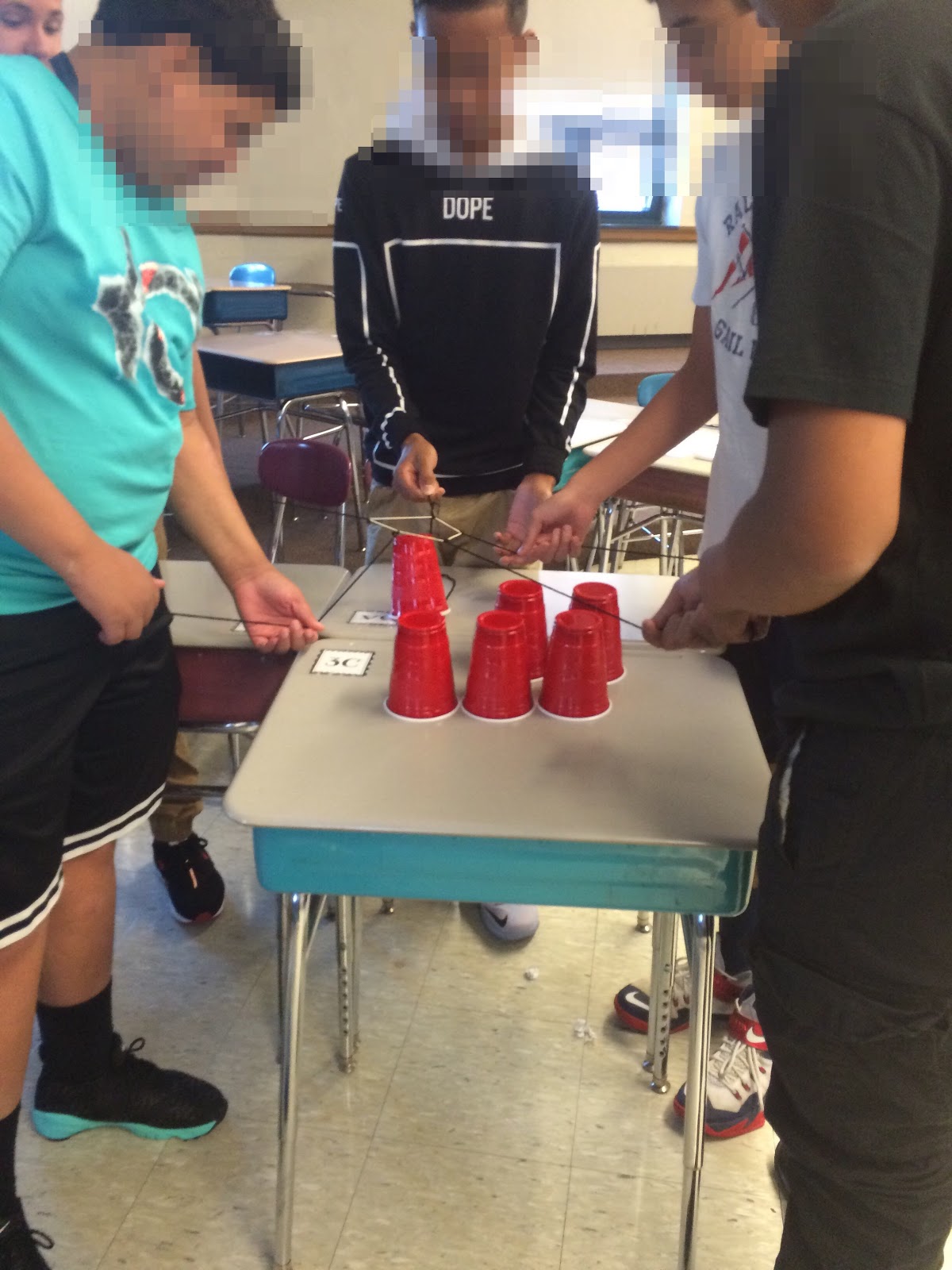
#2 Over the summer I read this amazing book called learn Like a Pirate.  It was written by an amazing educator named Paul Solarz about his journey to create a student led classroom.  I'm going to slowly start to implement some of his ideas this year and I started with this fabulous team activity that I read about at Runde's Room. They looooove it and it really set us up to talk about working as a team where I am the coach.


#3 It is primary season baby!!!
I am an election enthusiast, nerd, and connoisseur! I created this fun primary board that we use for Do Nows and to spark amazing conversations.  I love that the whole school likes to stop by and talk with the kids about the race!  if you are interested, you can find it here at Teachers Pay Teachers.


Lastly, I'm gearing up for some amazing green screen videos and finally invested in some longer lasting fabric!


The kids can't wait to get out  our video studio up and running!!!

I'm Back!!!!.... and teaching vocabulary!

Saturday, February 7, 2015 2 comments
I'm back! I totally apologize to all my readers for disappearing for the last couple of months.  I took my first real grad class this fall and had no time to breathe.  Something had to give and unfortunately it was my blog.  But, the class is over and I am back!  I have so much to tell you but instead of one long post, be looking for short posts over the next week or so to catch you up!


The class I took was TONS of work but also very rewarding.  In Massachusetts, if you have even one student in your class who is and English Language Learner, you need to take a class called Rethinking Equity and Teaching for English Language Learners (RETELL). It's basically an intro to ELL and walks you through tried and true activities that helps ELLs succeed in the classroom. Being my second year in district, I found the class to be EXTREMELY helpful and my biggest takeaway is direct vocabulary instruction. I have always felt that vocabulary is such an important part of teaching social studies and last year I just knew I wasn't cutting it. My students were just understanding vocabulary on the most superficial of levels and I knew it was because I was teaching a population I had never really experienced before.
In the class they taught us a vocabulary activity called the Seven Steps to preteach vocabulary. Here is a fabulous example of Seven Steps from an elementary teacher:


I knew this was exactly what I needed but I decided to tweak it for my class.  Now, almost every day, my kiddos walk in and we preteach a word or term they are going to need in order to understand the upcoming content (Tier 2 and Tier 3 Words). We do it in the same order every day:

  1. Introduce word and have them pronounce it twice.  Ask if they know anything about the word and identify and prefixes, suffixes, and/or base words.
  2. Have them write down a student friendly definition.
  3. Tell them how we are going to use it in content.  I also like to tell them how it is used in other contexts (for the word "convention" this week, we talked about the Constitutional Convention but we also talked about ComicCon).
  4. I show the kids a YouTube video that better illustrates the word or a visual.
  5. Lastly, the students are given a sentence stem that they need to finish with the students in their table groups.  We then share out as a class.
This method has truly revolutionized my class!  Not only are the kids truly understanding the vocabulary, it has allowed me to frontload my teaching.  As an example, I taught the term Articles of Confederation three days before we really learned about the Articles of Confederation.  The kids absolutely love it and have been acing their vocab quizzes like champs.  They can use the words weeks later in a sentence and I really feel like it has helped me make bigger connections in my content. 


I showed two different videos with this term.  The first clip, I explained to them, is how the British knew how to fight and the second video was how the Americans learned to fight from the native Americans.  We were able to compare and contrast the two styles and this whole lesson took less than ten minutes of my class.

If you're interested, I have started to gather together these vocab lessons and have made them available on Teachers Pay Teachers.


Head on over to TPT to check these out and look for more as I progress in the year!


Mind Blown!!!!

Sunday, July 27, 2014 3 comments

First, I need to apologize.... I feel like my blog has become nothing but an ad for my teachers pay teachers store. I've been spending a lot of time on my teachers pay teachers because well.... it's summer. I've been treating it like a part-time job that I work on after the kiddos go to bed and I've been creating some amazing stuff to revamp my beginning of the year units. But I need to get back to blogging!!!!

I have also been doing some amazing things with Ed Tech this summer. First off I took my first grad class since 1998. It was a fast and furious five day tech course and it was great to have a week to just play around with edtech. The coolest tech thing I've done, though, is attend a course I started today. It's given by the Edtech Teachers and if you haven't heard of them you totally need to look into them. I took this amazing two day workshop on how to use tech to meet the needs of all the students and your class as well as struggling learners. The class was the best class I've ever been to my entire career. I learned so many things that I didn't know I could do just with my own computer! I decided to create a list of five things that absolutely just blew my mind. I also included a Blendspace I created at the end of the page to show you everything that I learned.

Mind Blown #1 Did you know that you can organize your Google searches by reading levels? If you Google "Advanced Google Search". You will get a page like this.

You can organize your searches by file type, date published, and other filters. I love that you can organize by reading level. It's not the foolproof but when you choose show "only basic result" very kid friendly searches show up.

Mind Blow #2 I am always looking for new ways to differentiate readings in my class. I was introduced to this amazing website called printfriendly.com. With printfriendly.com you insert the URL of the webpage you would like to read. Once it loads it up, you can actually delete pictures, sidebars, paragraphs, an actual sentences. It saves as a PDF file. This is a fabulous way to take a current event article and make 3 to 5 different versions for the struggling readers in your class.

Mind Blown #3

For those of you that have been reading my blog, you've probably noticed that I've been trying to accommodate readings in my classroom by adding videos, screen casting, and audio. I've been using different apps and trying different websites. What I didn't know is that the fabulous MacBook I have can do it without downloading anything. If you go to your QuickTime player underneath File you can do a new screen recording. I can screen cast right from my computer with no other add-ons whatsoever. Fabulous!

Mind Blown # 4

Did you know that if you have a Mac you have the amazing capability of taking any reading and summarizing it quickly? Find an article that you like on the Internet and copy it. Open up notepad on your Mac computer and paste the article into it. Once you do this you can right click and "summarize" is one of the options. There's a bar that you can actually scroll up and down to tell how large how small you want the summary. How unbelievable is this? Now I can take any article and summarize it so I can make different copies forget! Amazing!

Mind Blown #5

Lastly, I just found out that just by clicking the little microphone and my iPad I can dictate. I started in special-education 17 years ago. When we first started we would spend hundreds of dollars on Dragon speech software. I have never seen a more intuitive speech to text app and than what comes right inside this iPad. Actually, this entire blog post was written just using the speech to text app. Again mind blown!

Below, I've included a link to my Blendspace page that incorporates how to videos and websites I described that I learned from that fabulous Edtech teachers conference. Look at the last two links on the page because those go back to the Edtech teachers website which is just amazing within itself.


So, are there any amazing things that you were using in your class to accommodate fear struggling learners? I would love to hear from everybody!